2D Tomography Reconstruction
This tutorial walks through a benchmark example using the 2D Tomography dataset with the classic Shepp-Logan phantom. We will explore the dataset, configuration, and interpretation of results.
The Dataset: Shepp-Logan Phantom
What is it?
The Shepp-Logan phantom is a standard test image created by Larry Shepp and Benjamin Logan. It serves as a model of a human head and is widely used to test image reconstruction algorithms in computed tomography (CT). The problem involves recovering the 2D cross-section image from its projections (sinogram) taken at different angles.
Real-world analogy: A medical CT scanner rotates around a patient, taking X-ray projections from many angles. The goal is to mathematically reconstruct the internal slice of the body from these projections.
Dataset Preview
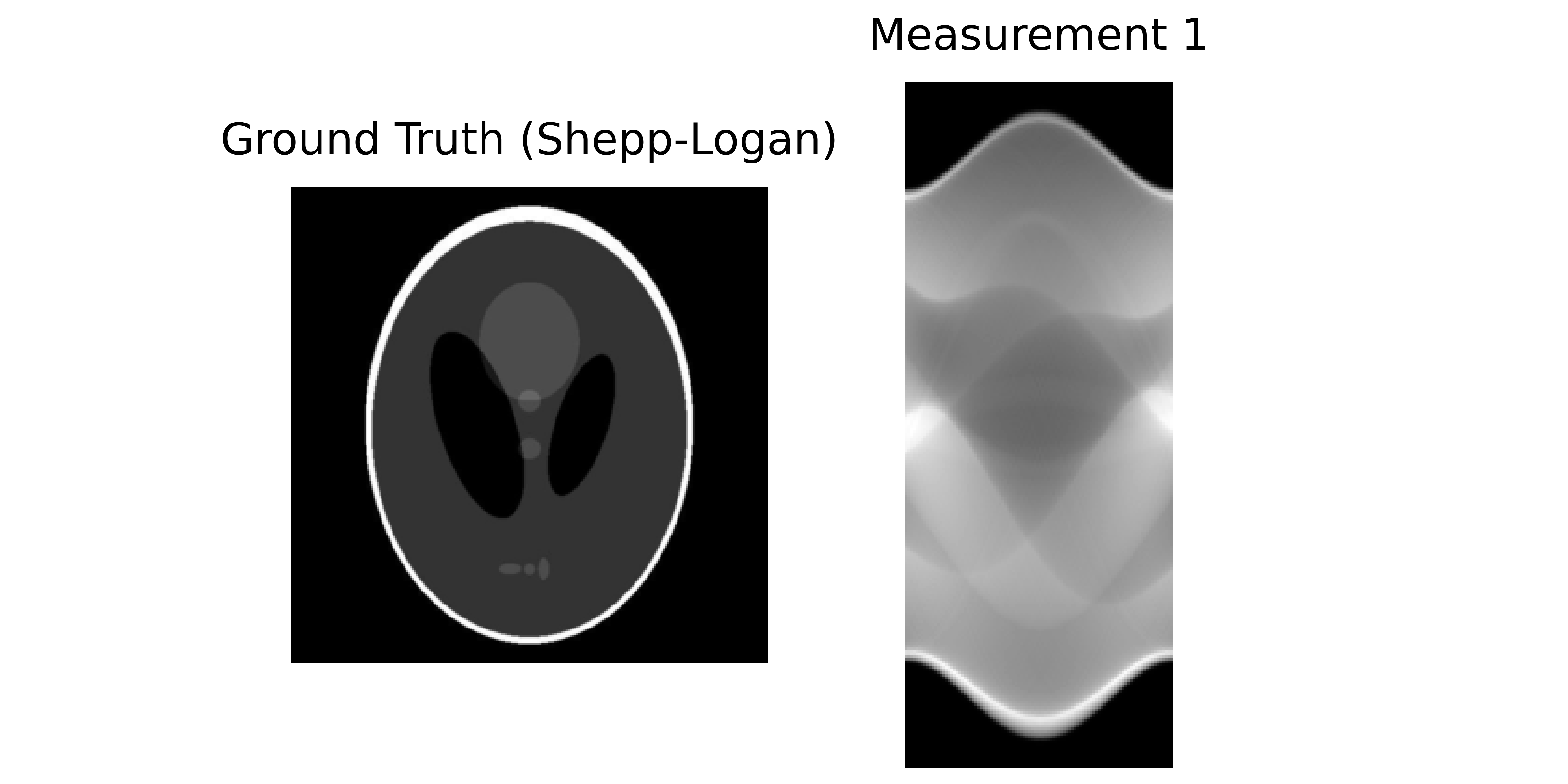
Left: Ground truth (Shepp-Logan phantom). Right: Sinogram (measurements).
Configuration: Experiment Setup
Benchmark Purpose
This experiment tests the scalability of reconstruction algorithms on high-resolution 2D images (2048×2048). Such high resolutions are common in modern specialized imaging but pose memory challenges. We compare single-GPU execution against a distributed multi-GPU approach.
We use the configuration file configs/tomography_2d.yml to set up the experiment.
Execution Grid
The execution grid compares a single-GPU baseline with a distributed 2-GPU configuration:
slurm_gres, slurm_ntasks_per_node, slurm_nodes, distribute_physics, distribute_denoiser, patch_size, overlap, max_batch_size: [
  ["gpu:1", 1, 1, false, false, 0, 0, 0],
  ["gpu:2", 2, 1, true, true, 448, 32, 0],
  ["gpu:4", 4, 1, true, true, 448, 32, 0],
  ]
Important: To ensure proper distributed parallelization, the number of tasks per node (slurm_ntasks_per_node) must equal the number of GPUs (slurm_gres). This ensures one process per GPU.
This creates a grid comparing three configurations:
Configuration 1: Single GPU (baseline)
["gpu:1", 1, 1, false, false, 0, 0, 0]
slurm_gres: gpu:1= 1 GPUslurm_ntasks_per_node: 1= 1 process per GPUdistribute_physics: false= No parallelization of blur operatorsdistribute_denoiser: false= Full image processed at oncePurpose: Baseline performance on limited resources
Configuration 2: 2-GPU with Distribution
["gpu:2", 2, 1, true, true, 448, 32, 0]
slurm_gres: gpu:2= 2 GPUsslurm_ntasks_per_node: 2= 2 processes (one per GPU)distribute_physics: true= Split 8 blur operators across 2 GPUs (4 each)distribute_denoiser: true= Spatial tiling: Split large image into patchespatch_size: 448= Each patch is 448×448 pixelsoverlap: 32= Overlap region for smooth transitions between patchesPurpose: Multi-GPU scalability with operator and spatial distribution
Configuration 3: 4-GPU with Increased Distribution
["gpu:4", 4, 1, true, true, 448, 32, 0]
Similar to Config 2, but with 4 GPUs.
Purpose: Further scalability test with more GPU resources
For more details on distributed computing, see the DeepInv distributed documentation.
Dataset Parameters
dataset:
  - tomography_2d:
      img_size: 2048
      num_operators: 8
      num_angles: 100
      noise_level: 0.01
img_size: 2048: A high resolution for standard testing.num_operators: 8: Number of tomography operators (angle splits).num_angles: 100: Total number of projection angles.noise_level: 0.01: Additive Gaussian noise level.
Solver
We use a Plug-and-Play (PnP) solver with a DRUNet denoiser:
solver:
  - PnP:
      denoiser: drunet
      denoiser_sigma: 0.01
      init_method: ["zeros"]
Solver Parameters:
denoiser: The pretrained denoiser to use as a prior.denoiser_sigma: Noise level hint passed to the denoiser. Helps the denoiser adapt to the noise level.init_method: How to initialize the reconstruction.
Interpreting Results
Benchmark Results
Below is an interactive dashboard comparing the configurations:
Interpretation
PSNR vs. Iteration & PSNR vs. Computation Time
All setups reach about the same final PSNR, so using multiple GPUs does not reduce reconstruction quality. The multi-GPU runs reach the target PSNR much faster than the single-GPU baseline, which shows the speedup clearly.
Time Breakdown: Gradient and Denoiser
The denoiser dominates runtime and is the main bottleneck. Adding more GPUs reduces denoiser time, but gradient time slightly increases since the gradient step is cheap, and communication between GPUs often takes longer than the computation itself.